

Dirty Data, Broken Pipelines, and the AFNP Cutover Nobody Talks About

Part 1 of 2 - The Real Pain Points of Migrating Data into Agentforce for Nonprofit
Most AFNP implementations fail quietly. Not at go-live. Not in UAT. They fail six months later when your fundraising team can't trust a report, your program team is manually reconciling records, and your shiny new Agentforce agent is hallucinating because it's reasoning over incomplete, inconsistent data.
The culprit, almost always, is data migration that was treated as a checkbox - not an architectural decision.
This is Part 1 of a two-part series. Here, we will cover the real pain points: what breaks, why it breaks, and the structural issues that cause migration projects to unravel.
In Part 2, we will walk through the practical framework Zenyus AI uses to migrate clean, AI-ready data into AFNP.
Why AFNP Migration Is a Different Beast
If you've done NPSP migrations before, it will catch you off guard. It's not just a data model change - it's a paradigm shift.
NPSP was built on top of standard Salesforce objects with a layer of managed package customisation bolted on. Accounts, Contacts, Opportunities - you knew where things lived. AFNP is built on the Salesforce Industries data model, which means Person Account, Parties, Relationships, Program Plans, Discovery Framework and a relational structure that doesn't map 1:1 to anything you've worked with before.
The specific shifts that bite migration teams hardest:
-
The Household Account model is gone. In NPSP, a Household Account is the primary container for individual donors. In AFNP, the Individual model uses Person Accounts by default. If you're migrating donor records without understanding this distinction, you will create duplicate entities, broken rollups, and gift records pointing at the wrong parent. Every time.
-
Relationships are explicit, not implied. NPSP had nContact relationships and Household membership through account structure. AFNP models relationships as first-class objects - Party Relationship records. If your source data has relationships living in custom fields, spreadsheet columns, or lookup hacks, they need to be transformed, not just loaded.
-
Recurring Giving is restructured. Recurring Donations in NPSP have a specific cadence model. AFNP's Recurring Giving object has different field mappings, different status logic, and different child record structures. Treat it like a migration of a separate module, not just a table rename.
-
Fundraising Management introduces new dependencies. If you're activating Fundraising Management in AFNP, gift records now have dependencies on Designations, Gift Commitments, and Payment Schedules that NPSP didn't have. Load order matters enormously.
The Five Sources of Migration Pain
In our experience across AFNP implementations - greenfield from spreadsheets, migrations from NPSP - the pain almost always traces to one of five root causes.
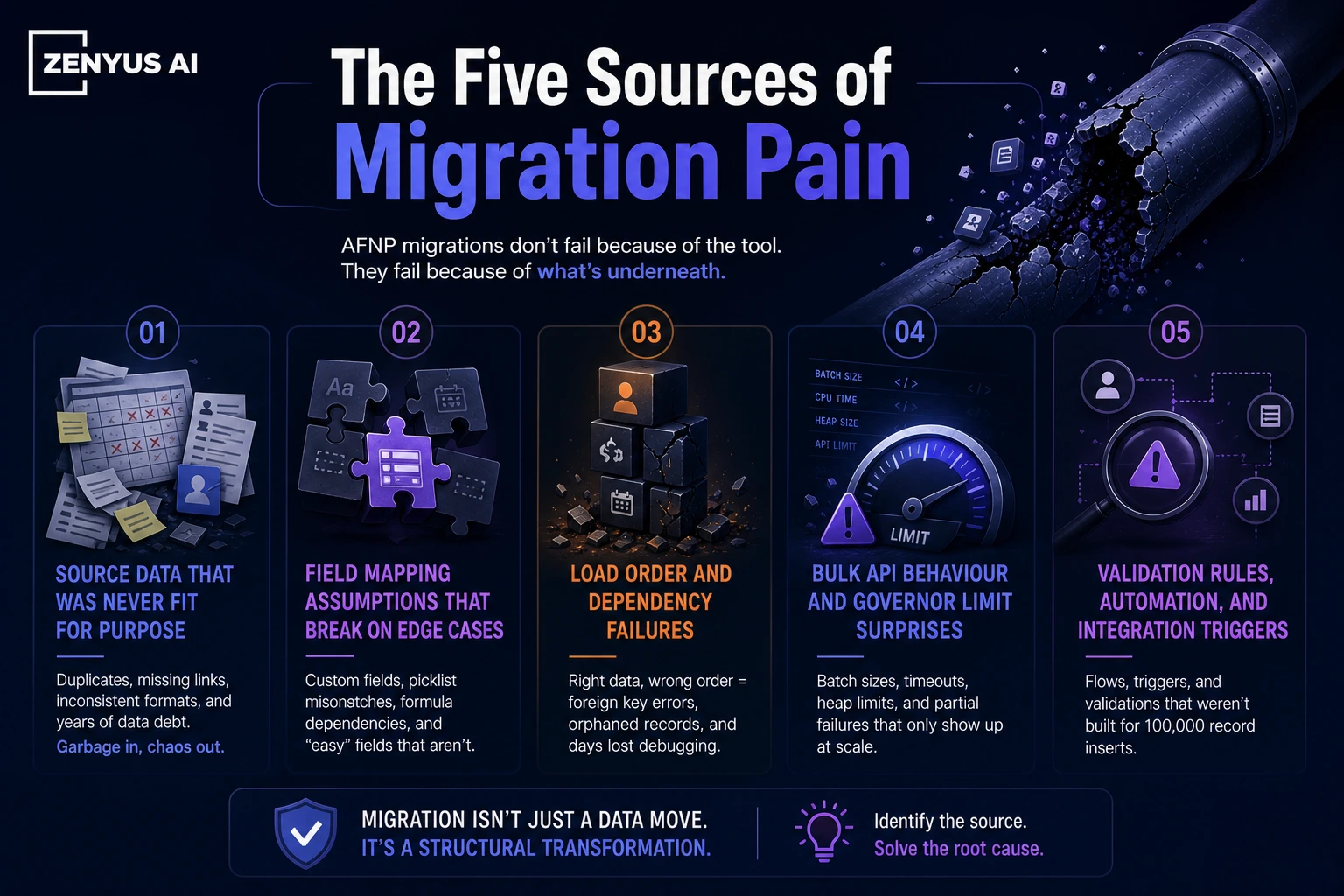
1. Source Data That Was Never Fit for Purpose
Most nonprofits have been running on a combination of CRM, spreadsheets, email inboxes, and institutional knowledge for years. When they finally consolidate into AFNP, what surfaces is years of deferred data quality debt.
Common symptoms: duplicate contacts with slightly different names and the same email, donation records with no associated contact, campaign attribution that doesn't match any actual program, custom fields that were repurposed three times and still contain the original values, and free-text address fields where someone typed "Level 51, 180 George St Sydney NSW 2000" in every possible variation.
There is no tool that will clean this for you automatically. Deduplication matching rules will help. Address standardisation services will help. But someone with domain knowledge still needs to make decisions about which record is the source of truth.
The mistake organisations make is treating this as a data migration task. It's actually a data governance task that happens to require a migration as the forcing function.
2. Field Mapping Assumptions That Break on Edge Cases
The first 80% of a field mapping exercise is easy. The last 20% is where projects stall.
Going from NPSP to AFNP, you have some obvious mappings: npe01__One2OneContact__c → the related Contact on the Person Account, Opportunity.Amount → Gift_Transaction.Total_Gift_Amount__c. Those are documented.
But what about your organisation's 47 custom fields on the Contact object? What about the formula fields that reference NPSP managed package fields that no longer exist in AFNP? What about the picklist values that were added by someone five years ago and now contain values that don't map to anything in the AFNP schema?
The edge cases compound. A single field like Salutation that seems trivial becomes a problem when your source data has "Dr.", "Dr", "dr.", "DR", "Doctor" as distinct values that need to normalise to a single Salesforce picklist value.
3. Load Order and Dependency Failures
Salesforce data loading has always been order-dependent. In AFNP, the dependency graph is deeper.
A gift transaction requires a gift commitment. A gift commitment requires a contact. A contact on a Person Account requires the account to exist first - but in AFNP, Person Accounts are created automatically when you insert a Contact with IsPersonAccount = true, so you need to understand whether you're inserting Accounts first or letting the platform create them.
If you're loading recurring gifts, the parent Recurring Giving record must exist before the child gift transactions. If you're loading relationships, both Party records must exist before the Party Relationship can reference them.
Get the load order wrong and you'll get a cascade of foreign key failures that are individually cryptic and collectively catastrophic. I've seen teams spend three days debugging a load failure that turned out to be a single batch job running before its dependency batch had completed.
4. Bulk API Behaviour and Governor Limit Surprises
This one specifically affects teams migrating large datasets - 500K+ records.
Salesforce's Bulk API v2 is the right tool for large-scale migration loads. But it behaves differently from standard DML in ways that matter for AFNP:
Triggers still fire on bulk loads unless you explicitly suppress them. If you have automation - flows, triggers, process builders - that runs on Contact or Account insert, it will run on every migrated record. For a 500K contact load, this can mean millions of flow interviews, and a job that should take two hours takes fourteen.
Duplicate rules run on insertion. If you haven't configured your duplicate rules to respect migration context, you'll get duplicate warnings or blocks on records that are legitimately distinct.
The allOrNothing flag in Bulk API v2 determines whether a batch succeeds atomically or partially. Most teams default to partial success (because it's easier to review errors), but partial success means your data can end up in an inconsistent intermediate state that's hard to identify and harder to clean up.
5. Validation Rules That Were Written for Users, Not Data
Validation rules are written assuming a human is filling in a form. They are not written assuming a migration script is loading 200,000 records at 11pm on a Sunday.
Required fields that users are prompted to fill in - but that have no equivalent in the source data. Date range rules that check whether a gift date is in the future. Cross-object validation that requires a related record to exist in a state that your migration data doesn't satisfy.
The solution isn't to delete your validation rules. It's to understand which ones are load-blocking versus data-quality enforcing, temporarily disable the load-blocking ones during migration windows, and have a documented process for re-enabling them and running a data quality pass after load.
Why This Matters More in the AI Era
Here's the thing that's changed the calculus completely: Agentforce.
Two years ago, dirty migrated data was an annoyance. Reports were slightly wrong. Rollups were slightly off. Staff worked around it.
Now, dirty migrated data is actively dangerous. Because AI reasons over it.
When you configure an Agentforce agent for your nonprofit - a fundraising assistant, a program case manager, a donor engagement bot - it doesn't know which records are migrated artifacts and which are real.
It surfaces incomplete donor histories as if they're complete. It recommends major gift outreach to a lapsed donor because the lapse data didn't migrate. It generates a program impact report that counts duplicate beneficiaries.
The output of your AI use cases is only as good as the data it reasons over. And the window to get that data right is migration. Once you're live and accumulating new data on top of a dirty foundation, remediation becomes exponentially harder.
What Good Looks Like
Before we get into the framework in Part 2, here's a summary of what organisations that run successful AFNP migrations have in common:
-
They start data profiling before they start field mapping. They know their source data's quality metrics before they make a single design decision.
-
They treat migration as a project phase with its own workstream, budget, and timeline - not a task at the end of the implementation.
-
They have a named data owner on the client side who has authority to make decisions about data quality, record survivorship, and acceptable thresholds.
-
They run multiple mock loads in a sandbox before they touch production. The first mock load is expected to fail. The fifth mock load should be clean enough to generate confidence.
-
And they define AI readiness criteria upfront - what does the data need to look like for their Agentforce use cases to work - and use that as the quality bar for migration sign-off.
Coming Up in Part 2
In Part 2, we will cover:
- The Zenyus AI data migration framework for AFNP: profile → map → transform → load → validate Specific tooling choices and when to use each
- How to structure your staging environment for AFNP-specific transformation
- The field mapping decisions that determine AI readiness
- Post-migration data quality scoring and what "good enough" actually means
About the author
Gourav Sood is a Salesforce Certified Technical Architect (CTA) and founder of Zenyus AI - a Salesforce consulting firm specialising exclusively in nonprofits and public sector organisations across Australia. He leads AFNP implementation and migration engagements for clients ranging from peak bodies to large community service organisations.
Have a migration you're working through? Connect with Gourav on LinkedIn or reach out via zenyus.ai
Gourav Sood
Salesforce Certified Technical Architect (CTA) with 19+ years of experience in enterprise technology. Gourav specializes in multi-cloud architecture and strategic consulting for the nonprofit and public sectors.
Explore Zenyus
Continue your Salesforce and nonprofit digital transformation journey with our tools, stories, and resources.
Ready to Transform Your Salesforce Strategy?
Let our Certified Technical Architect guide your digital transformation with proven expertise.
Related Articles
De-Risking Your AFNP Migration: A Business Leader’s Guide
How to protect data integrity, control costs, and maximize ROI when migrating to Salesforce’s next-generation nonprofit platform.
Salesforce NPSP vs. Agentforce for Nonprofit
NPSP vs Agentforce for Nonprofit: understand the real differences in architecture, data model, and capabilities and how to choose the right platform for your organisation’s future